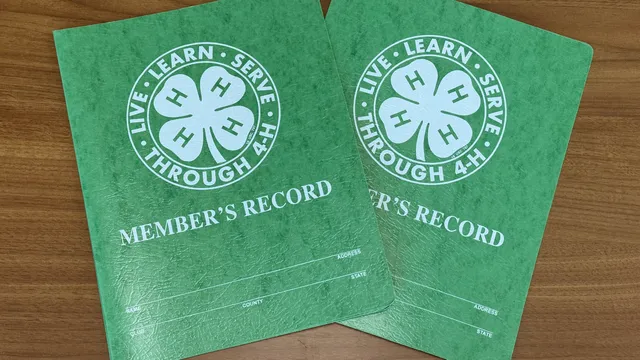
Keeping records is an important part of the 4-H experience. It helps members document what they have learned and accomplished while reflecting on their growth over time. Through record keeping, 4-H’ers can track their achievements and organize the skills they develop through projects, leadership, citizenship, and community service.
- Project records document what a member learned and accomplished in a project area during a single program year.
- Age divisions: 8–10, 11–12, 13–15, and 16–18.
- Portfolios document a member’s overall experience and accomplishments within a project area across a three-year period.
- Age divisions: 13–15 and 16–18.
Project Records
State Deadline: March 1, 2027
(Check with your county 4-H office for local submission deadlines.)
Project Record Forms
- Google Doc Version (Digitally filled)
- PDF Version (Handwritten)
- Kaleidoscope Version (NEW ONLINE SYSTEM)
All project records (regardless of format) are printed and submitted physically to your county 4-H office.
Project Record Sections
Project records are divided into several sections designed to help members document, organize, and reflect on their experiences throughout the program year. Each section highlights a different part of the member’s growth, involvement, and learning through 4-H.
1. Let’s Get to Know You!
- This section collects general information about the member, including contact information, age, county, and parent or guardian information.
2. 4-H Information
- This section includes basic information related to the member’s participation in 4-H during the program year, including project category, years in 4-H, club involvement, and age division.
3. 4-H & YOU!
- This reflection section gives members an opportunity to share personal thoughts about their experiences in 4-H, including favorite memories, important lessons learned, role models, and ideas for the future of the program.
4. My 4-H Story
- Members use this section to tell the story of their overall 4-H experience and personal growth throughout the year.
- This section may include reflections on project work, skills developed, goals, people who provided support, accomplishments, and the impact 4-H has had on their life.
- Maximum length: Four pages.
5. Leadership
- The leadership section highlights ways members have guided, taught, organized, or helped others during the program year.
- Examples may include holding offices, leading activities, mentoring younger members, teaching workshops, helping with events, or recruiting new members.
6. Citizenship
- The citizenship section highlights civic engagement and involvement within communities during the program year.
- Examples may include representing 4-H at meetings, participating in civic education opportunities, promoting 4-H within the community, or communicating with elected officials.
7. Community Service
- The community service section highlights volunteer work and service activities completed during the program year.
- Examples may include food drives, community cleanups, fundraising efforts, nonprofit volunteer work, or projects that helped improve the community.
8. 4-H Awards and Recognitions
- This section includes awards, honors, and recognitions received through 4-H during the program year.
- Only 4-H related awards should be included in this section.
9. Non-4-H Experiences
- This section provides an opportunity for members to highlight important activities and experiences outside of 4-H.
- Examples may include school organizations, sports, Scouts, church groups, camps, conferences, jobs, internships, or other extracurricular involvement.
10. Photos and Supporting Materials
- Members may include supporting materials that help showcase their project work and 4-H experiences during the year.
- Examples may include photos, news articles, certificates, records, displays, charts, reflections, or other project-related materials.
- A maximum of six pages of supporting materials may be included.
11. 4-H Goal Setting
- This section encourages members to think ahead and set goals for the upcoming year.
- Members should describe what they hope to accomplish, how they plan to achieve it, and when they hope to complete their goals.
12. Project Focus
- The project focus section highlights the specific project area within the member's chosen project record category.
- Members should describe project-related activities, learning experiences, and skills or knowledge gained through their project work.
- See Resources & Help for a list of project record categories.
13. Certification and Approval
- This final section confirms that the project record is complete and accurate.
- Required signatures from the member, parent or guardian, local 4-H leader, and county Extension agent must be completed before submission.
Portfolios
State Deadline: March 1, 2027
(Check with your county 4-H office for local submission deadlines.)
Portfolio Forms
- Google Doc Version (Digitally filled)
- PDF Version (Handwritten)
Portfolio Sections
Portfolios are divided into several sections designed to help members document, organize, and reflect on their experiences over the last three years. Each section highlights a different part of the member’s growth, involvement, and learning through 4-H.
Many of these sections are similar to those found within project records; however, portfolios focus on accomplishments, growth, and experiences accumulated over three consecutive years rather than a single program year.
1.Let’s Get to Know You!
- This section collects general information about the member, including contact information, age, county, and parent or guardian information.
2. 4-H Information
- This section includes basic information related to the member’s participation in 4-H, including portfolio category, years in 4-H, club involvement, age division, and the three reporting years included in the portfolio.
3. 4-H & YOU!
- This reflection section gives members an opportunity to share personal thoughts about their experiences in 4-H over the past three years, including favorite memories, important lessons learned, role models, and ideas for the future of the program.
4. My 4-H Story
- Members use this section to tell the story of their overall 4-H experience and personal growth.
- This section may include reflections on project work, skills developed, goals, people who provided support, accomplishments, and the impact 4-H has had on their life.
- Maximum length: Four pages.
5. Leadership
- The leadership section highlights ways members have guided, taught, organized, or helped others during the past three years.
- Examples may include holding offices, leading activities, mentoring younger members, teaching workshops, helping with events, or recruiting new members.
- Activities should be organized by reporting year, beginning with the most recent year.
6. Citizenship
- The citizenship section highlights civic engagement and involvement within communities during the past three years.
- Examples may include representing 4-H at meetings, participating in civic education opportunities, promoting 4-H within the community, or communicating with elected officials.
- Activities should be organized by reporting year, beginning with the most recent year.
7. Community Service
- The community service section highlights volunteer work and service activities completed during the past three years.
- Examples may include food drives, community cleanups, fundraising efforts, nonprofit volunteer work, or projects that helped improve the community.
- Activities should be organized by reporting year, beginning with the most recent year.
8. 4-H Awards and Recognitions
- This section includes awards, honors, and recognitions received through 4-H during the past three years.
- Only 4-H related awards should be included in this section.
- Activities should be organized by reporting year, beginning with the most recent year.
9. Non-4-H Experiences
- This section provides an opportunity for members to highlight important activities and experiences outside of 4-H over the past three years.
- Examples may include school organizations, sports, Scouts, church groups, camps, conferences, jobs, internships, or other extracurricular involvement.
- Activities should be organized by reporting year, beginning with the most recent year.
10. Photos and Supporting Materials
- Members may include supporting materials that help showcase their project work and 4-H experiences during the most recent program year.
- Examples may include photos, news articles, certificates, records, displays, charts, reflections, or other project-related materials.
- A maximum of six pages of supporting materials may be included.
11. Project Focus
- The project focus section highlights the specific project area within the member's chosen portfolio category.
- Members should describe project-related activities, learning experiences, and skills or knowledge gained through their project work during the past three years.
- Activities should be organized by reporting year, beginning with the most recent year.
- See Resources & Help for a list of portfolio categories.
12. Certification and Approval
- This final section confirms that the portfolio is complete and accurate.
- Required signatures from the member, parent or guardian, local 4-H leader, and county Extension agent must be completed before submission.
Resources & Help
Project Record & Portfolio Categories
Project record and portfolio categories help members organize their experiences based on the primary project area represented in their project record or portfolio. Each category represents a broad area of interest within 4-H and includes a variety of related projects and activities.
Project Records: Members may complete one project record per category each program year. Members participating in multiple project areas may complete project records in different categories; however, no more than two project records may be submitted for district competition during a program year.
Portfolios: Members ages 13–15 and 16–18 may submit up to two portfolios for district and state competition each program year. Each portfolio must be entered in a different portfolio category.
- Animal Science
These projects focus on the care, management, health, and understanding of animals. Members may explore livestock, pets, wildlife, embryology, and other animal related experiences.
- Citizenship & Civic Education
These projects focus on serving communities, civic engagement, leadership, and understanding how individuals can make a positive impact through service and involvement.
- Communication Arts
These projects focus on creative expression and sharing ideas through visual, written, and spoken communication. Members may explore photography, public speaking, graphic design, journalism, theater arts, and digital media.
- Electric (Portfolio Only)
These projects focus on electricity, electronics, energy, and electrical technology. Members may explore electrical wiring, circuits, renewable energy, energy conservation, electronics, electrical safety, and related hands-on learning experiences.- Members entering an electric portfolio may be considered for selection to attend 4-H Electric Congress as a portfolio delegate; however, submission does not guarantee selection.
- Note: The Electric category is available for portfolios only and is not available as a project record category. Members completing project records focused on these topics should enter under Science & Technology.
- Environmental Science
These projects focus on understanding the natural world, conservation, ecosystems, and environmental stewardship through hands-on exploration and outdoor learning experiences.
- Family & Consumer Sciences
These projects focus on practical life skills related to families, finances, food, creativity, and everyday living. Members may explore cooking, sewing, entrepreneurship, interior design, and personal finance.
- Healthy Lifestyles
These focus on physical, mental, and emotional well-being. Members may explore nutrition, fitness, safety, outdoor recreation, shooting sports, and other wellness related activities.
- Personal Development & Leadership
These projects focus on building confidence, leadership, responsibility, and personal growth through service, career exploration, hobbies, and skill development opportunities.
- Plant Science
These projects focus on growing, studying, and understanding plants and soil systems. Members may explore gardening, horticulture, crops, agriculture, and environmental growing practices.
- Science & Technology
These projects focus on exploration, innovation, and problem-solving through science, engineering, computers, robotics, mechanics, and emerging technologies.
See "Where Does My Project Fit?" for examples of common projects within each category.
Where Does My Project Fit?
Project record and portfolio categories help members organize their experiences based on their primary project area.
Below are examples of common project focuses that fit within each of the nine categories. If you do not see your specific project listed, contact your 4-H agent for assistance in determining the best category.
Animal Science
- Beef Cattle
- Birds
- Cat
- Dairy Cattle
- Dog
- Embryology
- Goat
- Horse
- Lamb
- Pets
- Poultry
- Rabbit
- Small Animals
- Swine
- Wildlife
Citizenship & Civic Education
- Citizenship
- Community Service
- History (e.g., Revolutionary War reenactment)
Communication Arts
- Arts & Crafts
- Clowning
- Communications
- Cultural Arts
- Photography
- Public Speaking
- Scrapbooking
- Theater Arts
- Visual Arts
- Woodworking
Environmental Science
- Entomology
- Environmental Science
- Forestry
- Geology
- Water / Wetlands
Family & Consumer Sciences
- Babysitting
- Clothing & Textiles
- Cooking
- Entrepreneurship
- Finance
- Generational Studies
- Interior Design
- Sewing
Healthy Lifestyles
- Archery
- Exercise
- Fishing
- Food & Nutrition
- Health
- Hiking
- Safety
- Shooting Sports
Personal Development & Leadership
- Career Development
- Child Development
- Hobbies
- Leadership
- Stamp Collecting
Plant Science
- Crops
- Gardening
- Horticulture
- Plant & Soil Science
Science & Technology
- Aerospace
- Artificial Intelligence
- Bicycle
- Computer
- Electricity (For portfolios, Electricity is entered in a separate Electric category rather than Science & Technology)
- GIS Mapping
- Robotics
- Small Engines
- Veterinary Science
Citizenship vs. Community Service: What's the Difference?
Many 4-H members have activities that could seem like they fit in either Citizenship or Community Service. While both are important, they serve different purposes.
Citizenship
Citizenship focuses on understanding communities, government, and civic processes. These activities help members learn how decisions are made, how communities function, and how individuals can make their voices heard.
Good Citizenship activities often involve:
- Learning about government and civic systems
- Understanding community issues
- Participating in civic processes
- Advocating for change or improvement
- Representing the interests of others
- Developing leadership in public and community settings
Examples of Citizenship activities:
- Attending a county commissioners or town council meeting
- Meeting with elected officials
- Writing letters to government representatives
- Presenting youth concerns to a school board
- Participating in 4-H officer elections
- Serving as a 4-H officer or representative
- Promoting 4-H to community leaders
- Studying local history or civic organizations
Community Service
Community Service focuses on helping others through volunteer work and direct service. These activities improve the quality of life within a community by meeting needs and supporting people, organizations, or causes.
Good Community Service activities often involve:
- Giving back to others
- Volunteering time
- Helping people in need
- Improving the community
- Supporting organizations or causes
- Providing a direct benefit to others
Examples of Community Service activities:
- Food drives
- School supply drives
- Care package projects
- Community or park clean-ups
- Recycling and beautification projects
- Making cards for nursing homes
- Creating mental health baskets
- Building buddy benches
- Volunteering at shelters
- Assisting with pet adoption events
Quick Tip
Ask yourself:
- Was I learning about government, civic engagement, leadership, or how communities make decisions? → Citizenship
- Was I volunteering my time to help people, organizations, animals, or community spaces? → Community Service
Some activities may include elements of both. In those cases, choose the section that best reflects the primary purpose of your involvement.
View or download the Citizenship vs. Community Service Reference Guide
Sample Project Records (2018) Unity ID Login Required
Score Sheets
- Project Record Score Sheets
- Portfolio Score Sheet
- Group Award Score Sheet
New Online System
For the first time, 4-H project records may be completed online through Kaleidoscope.

Beginning in 2026, members have the option to use Kaleidoscope to complete and print their project record instead of filling out the traditional version.
Both options are acceptable for the current program year. Members may choose the format that works best for them based on county guidance and personal preference. Regardless of which format is used, completed project records will still be printed and submitted as physical copies through your county 4-H program.
Kaleidoscope is used to create, save, and print project records electronically throughout the year. Final submission procedures remain the same as previous years unless otherwise instructed by your county.
Note: Portfolios cannot be completed using the online system at this time.
Using Kaleidoscope
Once a project record application has been started, progress will save automatically as sections are completed. Members may return to their project record at any time to continue updating activities, achievements, project information, and other required sections.
The Kaleidoscope version follows the same general structure and requirements as the traditional project record format while providing a more interactive online experience.
Printing and Submission
Kaleidoscope is used to complete and print the project record only. Project records are not submitted electronically through the system at this time.
Once completed, members should print their full project record directly from Kaleidoscope, along with the required signature page.
After signatures have been collected, printed materials should be submitted following county instructions and deadlines.
Important Notes
- Both the Kaleidoscope and Google Doc/PDF formats are acceptable for the 2026 program year.
- Project records completed through Kaleidoscope must still be printed for submission.
Kaleidoscope Resources & Help
Frequently Asked Questions
How do I create an account and start an application?
- Go to the Kaleidoscope section of our website and click "Complete your Project Record via Kaleidoscope."
- You will be directed to the “Program Details” page.
- On the right side of the screen, click “Log in to Apply.”
- If you already have an account, enter your login information.
- If you do not have an account, click “Create an Account” and follow the prompts. Be sure to save your password.
- If you have trouble logging in, try a few different password combinations.
- After logging in, you will be taken directly to the application.
- Begin with the “Let’s Get to Know You” section.
How do I create another application?
To create a new application, first select the program details on the left side of the screen. Then return to the main home screen. If you are logged in, click the “View Applications” button on the right side. From there, select “Start New Application” under your current applications.
If you are not logged in and are on the program page, you will see options to “Log in to Apply” or, if you are a new user, “Start New Application.”
Can I have two children on one account?
Yes. Follow the steps to create a new application, but under the “Let’s Get to Know You” section and the application name field, specify which 4-H’er will be completing the application.
How can I tell the difference between my applications?
Each application has a unique identifying number located in the top right corner of the application tile on the dashboard.
How do I access Qualified Programs (Project Focus)?
Complete and “submit” your general application first, including all required sections. This initial submission does not officially finalize your application. Your application will remain open and editable until the deadline.
After submitting, you can access your Qualified Programs or Project Focus areas by clicking the “Qualified Programs” button within your application or from your application dashboard.
If you are completing more than one project record, you may select multiple Project Record Categories within the 4-H Information section. Be sure to click “Save” each time you return to make edits. Your changes will continue to update automatically in the system until the application closes.
Why can I only see limited information in the Leadership and Citizenship sections?
The system may limit how much information is displayed while you are entering activities. However, once the application is saved as a PDF and printed for review, all entered information will be visible to judges.
Virtual Help Sessions
In September 2026, North Carolina 4-H hosted two virtual Kaleidoscope help sessions for individuals who registered to learn more about the new online project record system. Recordings of both sessions are available below for those who were unable to attend or would like to revisit the information shared.
Additional questions about Kaleidoscope, the online project record format or using the platform should be directed to Jacob Hanlon or Lauren Hoesli.
Contacts